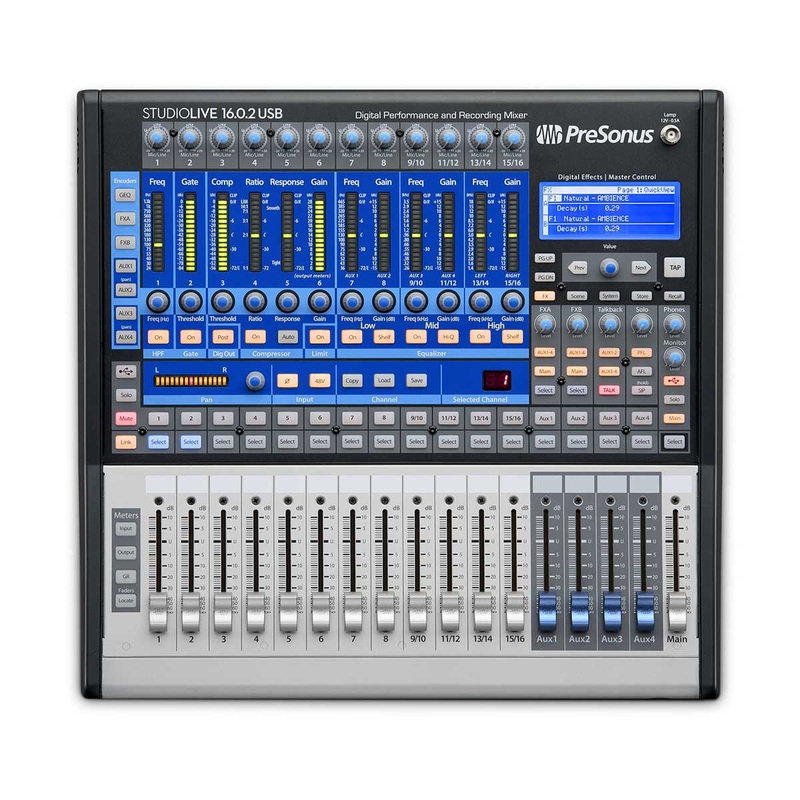
When youre mixing a live event or have an artist in the studio, you need to be able to work quickly. The StudioLive 16.0.2 USBs familiar, easy-to-use interface keeps all critical controls visible and accessible not buried in menus or layers. Our design philosophy is simple: One fader for every mono or stereo channel; one output for every bus. Add to that easily accessed, color-coded function buttons; rotary trim controls; and clearly labeled, individual knobs for EQ and dynamics processing. Aux sends have their own physical controls. Every channel has a big, bright meter display. But dont let the analog feel fool you: The StudioLive 16.0.2 USB offers the power of modern digital mixing, multitrack recording, wireless remote control, and more.
In a footprint of less than 2 square feet (0.19 square meters), the compact, 16-channel StudioLive 16.0.2 USB offers 8 mono input channels, 4 stereo channels, and 4 aux buses, each with a high-quality, 60 mm fader. You get generous analog I/O, 12 XMAX Class A solid-state mic preamps, a Talkback input with Class A mic preamp, extensive signal processing with physical controls, MIDI control, accurate metering, and a built-in multichannel recording interface. As with all StudioLive mixers, the 16.0.2 USB comes with a suite of tightly integrated recording, control, and audio analysis software. And its so lightweight and compact that you can easily hold it in one hand and tuck it under your arm.
Features
8 mono mic/line channel inputs, each with:
- High-headroom Class A XMAX mic preamplifier
- XLR mic and balanced -inch line inputs
- 60 mm precision fader
4 stereo line channel inputs, with:
- High-headroom Class A XMAX mic preamplifier (Ch. 9, 11, 13, and 15)
- XLR mic inputs (Ch. 9, 11, 13, and 15)
- Balanced -inch line inputs (Ch. 9-16)
- Unbalanced RCA line inputs (Ch. 13-16)
- 60 mm precision fader (4 stereo)
- 4 Auxiliary buses (pre/post-fader send)
2 Internal FX buses
2 stereo 32-bit digital effects processors with customizable reverb and delay presets
Fat Channel signal processing on all channels and buses, with:
- 3-band semi-parametric EQ (individual band on/off)
- Full-featured compressor
- Standard downward expander
- Limiter
- Phase reverse (12 mic preamplifiers only)
- Pan with dedicated 15-LED display
- Stereo link for input channels and aux buses
- Highpass filter
One 31-band stereo graphic EQ (on main outputs only)
18-in/16-out USB recording interface (24-bit/44.1 kHz and 48 kHz)
- Compatible with most audio software via ASIO, Windows Audio, Core Audio
Scene store and recall
Settings can be copied among channels and buses and saved as user presets.
Software bundle includes:
- PreSonusStudio OneArtist digital audio workstation for Macand Windows
- PreSonus Capture live-recording software for Mac and Windows
- PreSonus UC Surface mixer-control software for Mac, Windows, Android, and iPad
- Free downloadable PreSonus QMix-UC software for iPhone/iPod touchand Android provides wireless remote control of aux mixes
Lockout mode protects your settings from meddlers and accidents
MIDI Control Mode provides control over:
- Scene and FX Preset recall
- Main Volume, FXA, and FXB output levels
- FXA and FXB assign/unassign to Mains
Computer system requirements:
Below are the minimum computer-system requirements for UC Surface, QMix-UC, and Studio One.
Mac
- macOS 10.11 or higher (64-bit only)
- Intel Core 2 Duo processor (Intel Core i3 or faster recommended)
- 4 GB RAM (8 GB or more recommended)
Windows
- Windows 7 x64 SP1 + platform update, Windows 8.1 x64, Windows 10 x64
- Intel Core 2 Duo (Intel Core i3 or faster recommended)
- 4 GB RAM (8 GB or more recommended)
Mac and Windows Systems
- USB 2.0 port
- Internet connection
- Internal or external 7200 RPM storage drive highly recommended
- 30 GB hard disk space
- Monitor with 1366×768 resolution
iOS
- iOS 10 or later
- iPad Pro, iPad Air 2, iPad Air, iPad mini 4, iPad mini with Retina display, iPad (4th generation)
Android
- Android 5.0 (Lollipop) or later
- Android smartphone (QMix-UC)
- Android tablet (8-inch) with 1024×768 resolution (UC Surface)
Note: The minimum system requirements may differ for DAWs other than Studio One. Please check the requirements for your DAW of choice with its manufacturer.
Note that the speed of your processor, amount of RAM and size and speed of your hard drive will greatly affect the overall performance of your recording system. Also, a more powerful system (faster processor with more RAM) will allow for lower latency (signal delay) than you might experience while monitoring audio signals.